

£1,296.00
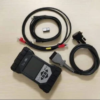
Used JLR DOIP VCI WiFi Bosch Genuine Diagnostic Tool Support SDD + Pathfinder + Topix Cloud
The new JLR-approved DOIP VCI is the only unit compatible with Pathfinder and all JLR vehicles with new architectures (from Range Rover/Range Rover Sport L405/L494 17MY onwards).
Additionally, it enables enhanced diagnostics that Pathfinder offers retailers. Moreover, the DOIP VCI also interfaces with 14-16MY Multi-CAN architecture vehicles on the Pathfinder diagnostic system.
Bank Transfer for Payment is only accepted for these devices.
14-16MY vehicle lines with DOIP VCI support:
- XE (X760)
- F-Pace (X761)
- F-Type (X152)
- XF (X260)
- XJ (X351) – 16MY only
- Evoque (L538)
- Discovery Sport (L550)
- Range Rover (L405)
- Range Rover Sport (L494)
- Defender All New Models and Sport, etc. – all supported in the Original Tool
All New Models for SDD, Pathfinder, and Cloud Cars are supported. Therefore, don’t waste time and money with clone tools. Use only the original for peace of mind when dealing with cars worth £100k+.
For Ready-to-go systems with Laptop and Pathfinder SDD Activation options, please check here.
No Topix Account is required by you.
The new JLR-approved Diagnostics over Internet Protocol (DoIP) VCI is the only unit compatible with Pathfinder and all new-architecture JLR vehicles from 17MY onwards.
JLR VCI Product Overview
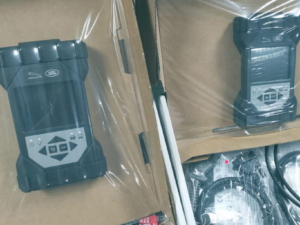
- Jaguar Land Rover Approved device
- Replacement for JLR SDD VCI’s
- Covers CAN, MultiCAN, ISO9141, and SCP Vehicle Networks
- Suitable for Legacy, Current, and Future Vehicles
- 2m USB Cable as standard included
- Easy to update for J2534 new functionality
Furthermore, the JLR VCI connects directly to the vehicle OBDII connector, then to the laptop via USB for use with SDD. Once the J2534 DLL files are loaded, this product allows normal operation with the JLR SDD Diagnostic Tool. All communication is possible with this device.
Package Includes
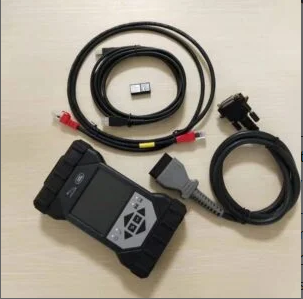
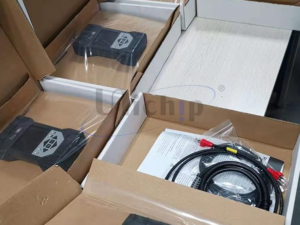
- 1pc x OEM Original JLR DoIP VCI (Used)
- 1pc x OBD cable
- 1pc x USB cable
Jaguar Land Rover DoIP VCI Supported Functions
- Work with models after 2017 – supports Pathfinder software
- Work with models before 2016 – supports SDD software
- Support all SDD diagnostic & programming protocols
- Support all Pathfinder diagnostic & programming protocols
- Support Pathfinder activation service offline
- Support WiFi connection
- Support VBF file edit
- Support E-XML file editing
- Support SDD engineering software application
- Support Pathfinder engineering software application
- Support online programming, coding & key programming
- SDD software can update to the newest version with manufacturer’s engineers – supports online programming
- Pathfinder can update to the newest version with manufacturer’s engineers – supports online programming
- Can replace the JLR VCI box
- Can replace the JLR DoIP VCI box
- The NEW JLR DoIP VCI is the newest interface for Jaguar and Land Rover vehicles.
The Pathfinder Software
It is the only unit compatible with Pathfinder Software and all JLR vehicles with new architectures from 2017 onward. Additionally, it interfaces with 2014-2019 Multi-CAN architecture vehicles.
The SDD Software
All 2014-2018 vehicles without DOIP, and earlier models (2006-2014), will still use the SDD JLR software.
14-16MY Vehicles with DOIP VCI Support
- XE (X760)
- F-Pace (X761)
- F-Type (X152)
- XF (X260)
- XJ (X351) – 16MY only
- Evoque (L538)
- Discovery Sport (L550)
- Range Rover (L405)
- Range Rover Sport (L494)
Pre-14MY vehicles and those not listed above will continue using the current diagnostic system and VCI.
For Land Rovers from 1998-2009, the system is fully compatible with the T4 Product Platform. Moreover, the T4 Mobile Plus System software works with both Windows XP and Windows 10.
Frequently Asked Questions on JLR DOIP
How does the JLR VCI get updated for future Software Updates?
Periodically, JLR releases updates to its drivers and software. These updates either add functionality or resolve field issues. The diagnostic test application handles driver and software updates, installing them on request. If you experience issues, always ensure you have the latest device software and drivers installed.
How to Install the Diagnostics over Internet Protocol (DoIP) VCI unit?
Before Installation:
- PATHFINDER requires a DoIP VCI unit to communicate with 2017 MY Range Rover L405, Range Rover Sport L494, and New Discovery L462.
- The DoIP VCI must be the only VCI connected to JLR-approved diagnostic equipment when using PATHFINDER.
- Future PATHFINDER communications will appear in the ‘Activity Stream’ section on Topix.
- Every retailer MUST have the DoIP VCI available in their workshop.
Please be aware that these instructions only apply to the first use of the VCI. Once initial installation is complete, the DoIP VCI is plug-and-play with PATHFINDER.
- Insert the DoIP VCI USB cable into the device and JLR-approved diagnostic equipment. Note: The ‘USB Input Device’ pop-up will appear – select ‘X’ to close it.
- Select the ‘Windows’ key.
- Select ‘All Programs’.
- Select ‘Bosch’.
- Select ‘VCI Software (JLR)’.
- Select ‘VCI Manager (JLR)’.
- Select the VCI icon on the screen.
- Select ‘Connect to VCI’.
- Select ‘VCI Update’.
- Select ‘Start Update’.
- The ‘VCI Manager Information’ pop-up appears – select ‘OK’ to continue. Note: Do not disconnect the DoIP VCI during the update process. The update takes approximately 12 minutes.
- The DoIP VCI will automatically restart. Wait for an audible beep, then select ‘OK’ to continue.
- Select ‘X’ and close ‘VCI Manager’. The DoIP VCI is now ready for use.
How to Set the Preferences in PATHFINDER?
- Select the PATHFINDER icon on the ‘JLR Application Launcher’.
- Select ‘Other User’ and enter your ‘User Identification’ and Password.
- Select ‘Independent Operator’ or ‘Authorised Repairer’.
- Select ‘OK’ and log in.
- Read the ‘Warning’ pop-up and select ‘OK’.
- Select the three-bar icon (top right), then the ‘Settings’ icon.
- Select the ‘Communication Interface’ tab, then ‘D-PDU’.
- The ‘Windows Security Alert – Windows Firewall’ pop-up appears. Do not select ‘Cancel’.
- In the pop-up, check both ‘Private Networks’ and ‘Public Networks’, then select ‘Allow Access’.
- Preferences are now set. The DoIP VCI is plug-and-play with PATHFINDER after initial setup.
JLR IDS SDD PATHFINDER YEARS COVERED
- 2023
- 2022
- 2021
- 2020
- 2019
- 2018
- 2017
- 2016
- 2015
- 2014
- 2013
- 2012
- 2011
- 2010
- 2009
- 2008
- 2007
- 2006
- 2005
KVM Keyless Vehicle Module
KVM Keyless Vehicle Module Supported Modules for Programming:
- Before DoIP DPLA
- Before DoIP FK72
- DoIP HPLA
- Latest DoIP K8D2
- Latest DoIP JPLA
No of Plugs on KVM:
- 2 Plug
- 3 Plug
Supported Software for KVM Replacement Programming:
- SDD
- Pathfinder
Supported Protocol for KVM Replacement Programming:
- DoIP
- MultiCAN
- CAN
- SCP
IDS JLR SDD SOFTWARE VERSIONS
JLR IDS SDD PATHFINDER SOFTWARE VERSION Guide:
- PATHFINDER Supports Jaguars & Land Rovers 2015 to Present
Only logged in customers who have purchased this product may leave a review.
Related products
OEM Diagnostic Tool
OEM Diagnostic Tool
JLR hardware
Reviews
There are no reviews yet.