DIY Feature Activation Guide

Unlock Hidden Features on Your JLR with JET-Pro & Enet

The complete guide to activating ACC, Dynamic Mode, ATPC, TR2 Auto and more on your 2017-2024 Jaguar or Land Rover — using JET-Pro software and a simple Enet cable or WiFi adapter. No dealer visit. No Pathfinder subscription. No TOPIx required.

See JET-Pro in Action

Watch the full demo: connect to your vehicle, read CCF, browse 130+ coding scripts, diagnose DTCs, and activate hidden features — all in under 2 minutes.

JET-Pro v1.5 — Connect, diagnose, code, and activate features on a 2024 Defender. Real-time interface walkthrough.

Defender, Range Rover & Jaguar Compatible
No Pathfinder Subscription Needed
ENET / WiFi Connection
2017-2024 Vehicle Support
Instant License Activation

What is JET-Pro?

JET-Pro (Jaguar Land Rover Engineering Tool Pro) is the most powerful aftermarket coding and diagnostics solution for modern JLR vehicles. It gives you engineering-level access to your vehicle's control modules — all without expensive dealer tools or cloud subscriptions.

Dealer-Level Power, DIY Price

For years, activating features like Adaptive Cruise Control (ACC), Dynamic Mode, ATPC, and TR2 Auto required a trip to the dealer or paying an independent specialist $500-$750 per session.

JET-Pro changes the game. With the software and a simple $17-109 Enet connection, you can perform these activations yourself in under 30 minutes.

Forum users on Land Rover Forums and Defender2 have confirmed success activating ACC on 2020-2022 Defenders, Dynamic Mode on Range Rovers, and numerous convenience features across the JLR lineup.

Get JET-Pro Full License

What JET-Pro Can Do

  • Activate ACC (Adaptive Cruise Control)
  • Enable Dynamic Mode & Configurable Dynamics
  • Turn on ATPC (All Terrain Progress Control)
  • Activate TR2 Auto & Terrain Response 2
  • Enable Park Assist & Auto Parking
  • Activate Apple CarPlay / Android Auto
  • Configure Approach Unlock & Walk Away Lock
  • Enable Auto High Beam Assist
  • Custom welcome screens (007, SV Bespoke)
  • Read & clear all DTCs across all modules
  • Full CCF (Car Configuration File) editing
  • Auto backup & restore factory settings
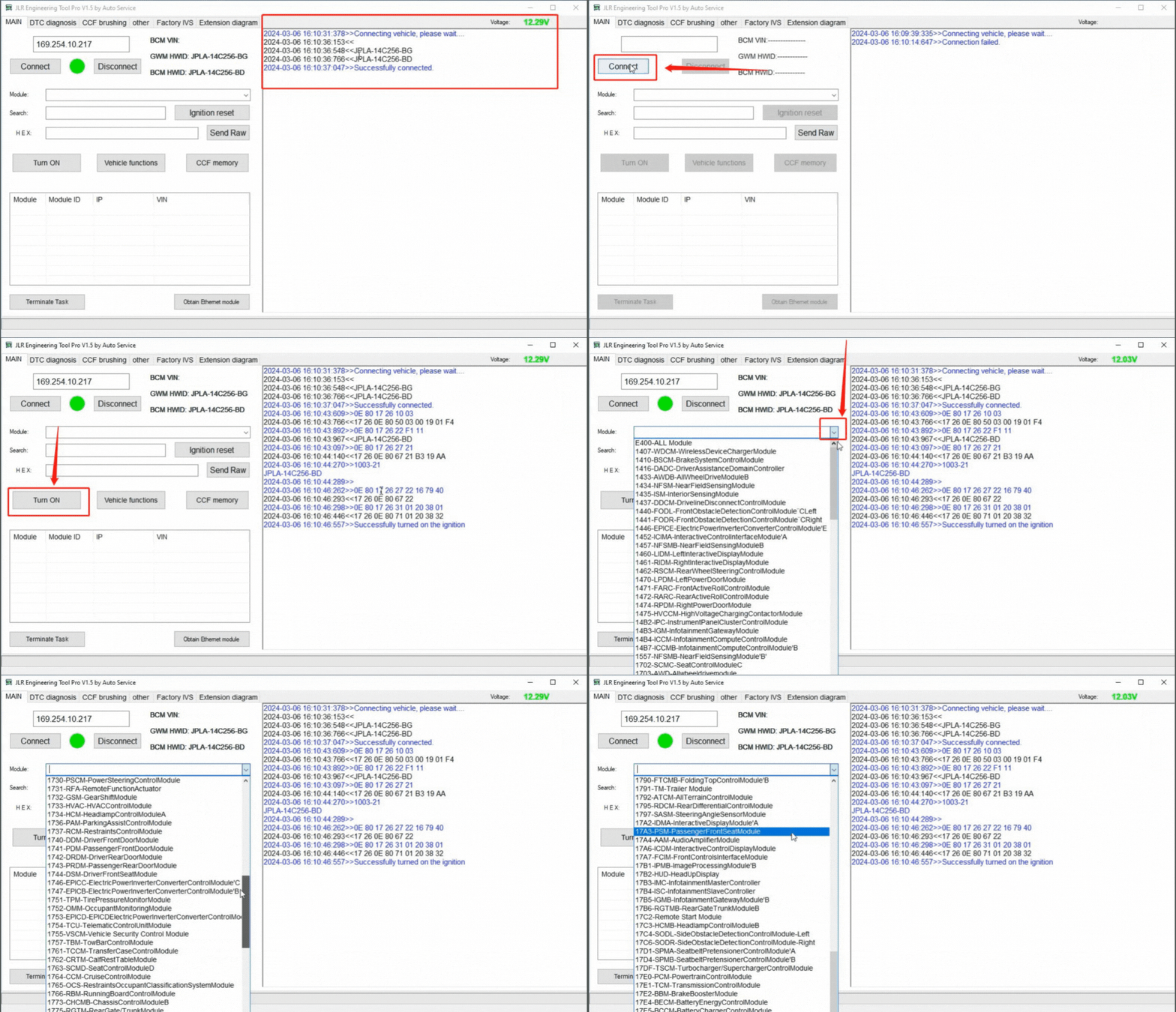
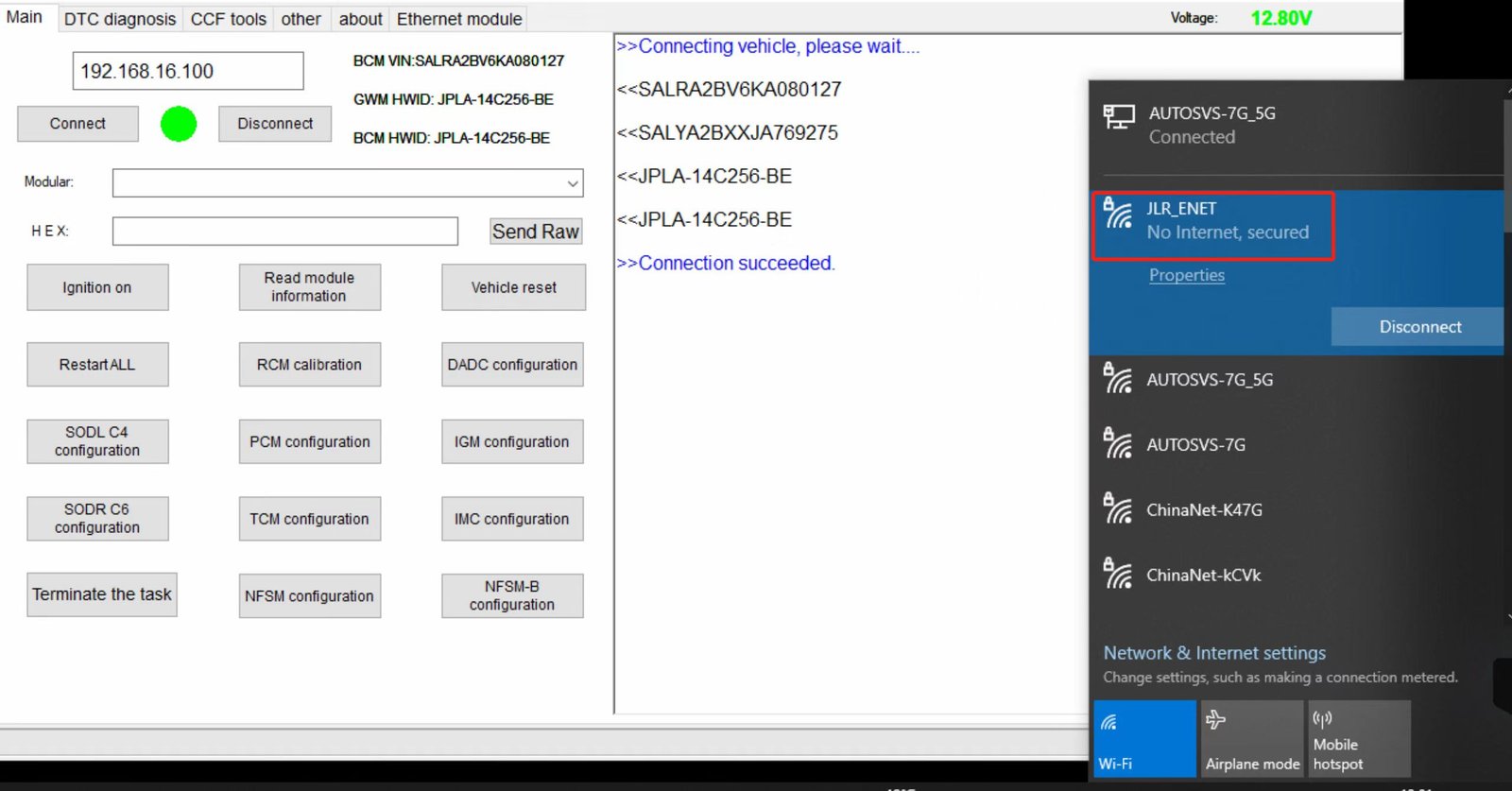
JET-Pro connected to JLR vehicle via JLR_ENET WiFi adapter — showing successful connection, VIN readout, and full module access

JET-Pro interface connected via JLR_ENET WiFi — real-time voltage, VIN detection, and full module access

Installing JET-Pro Software

Three simple steps to get JET-Pro running on your Windows laptop. License delivery is instant after purchase.

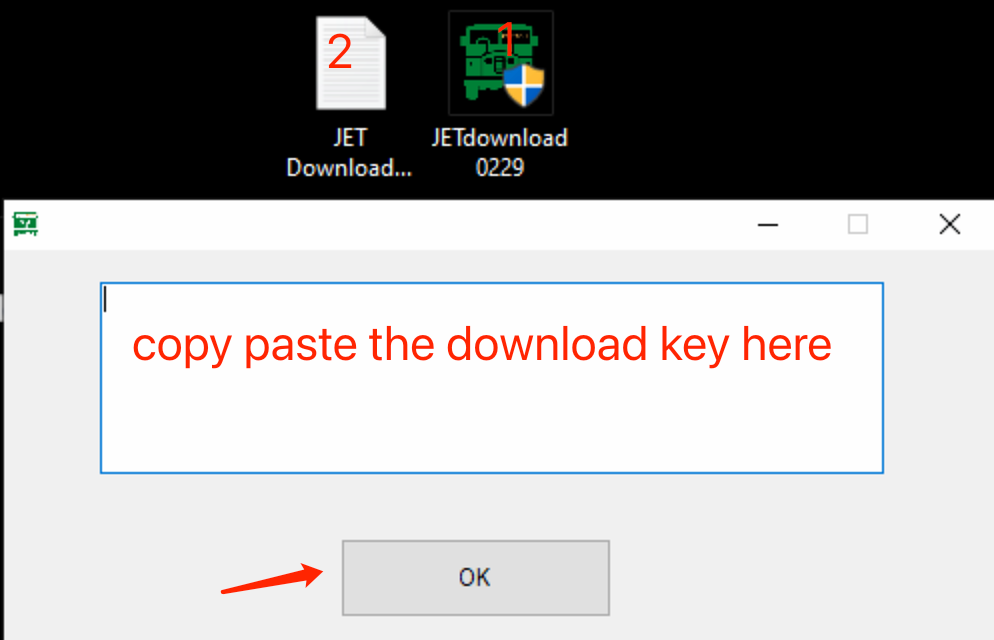
Copy and paste your JET-Pro download key
Step 1 — Enter Download Key
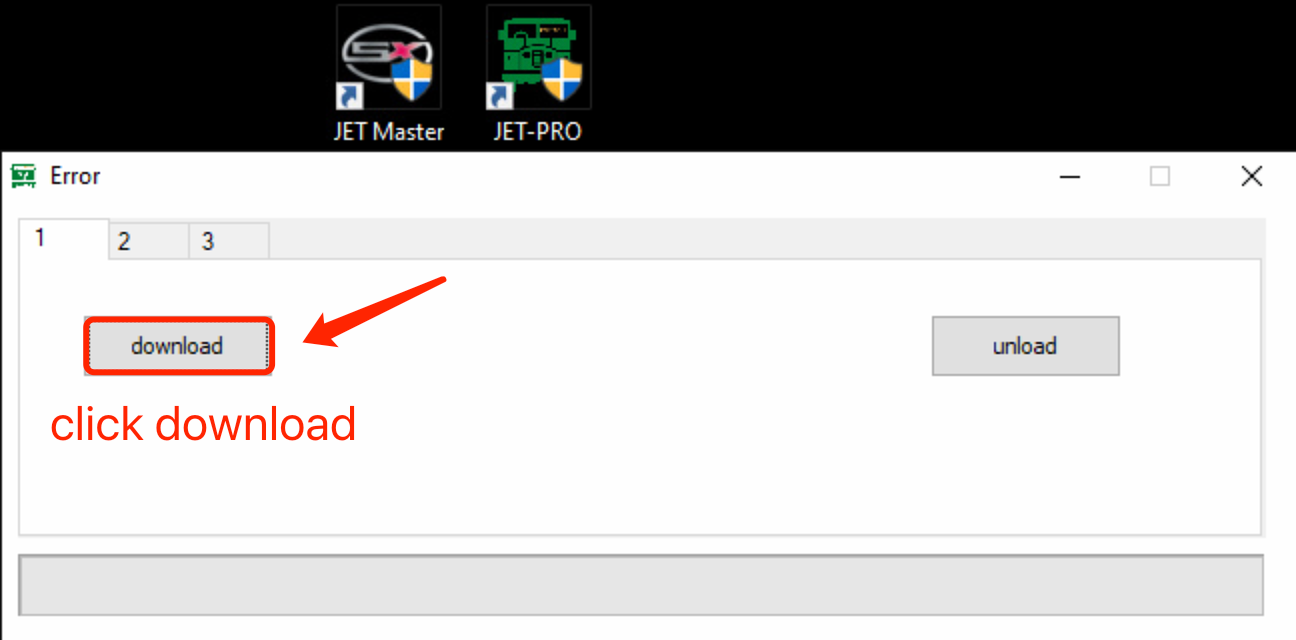
Click Download to install JET-Pro
Step 2 — Click Download
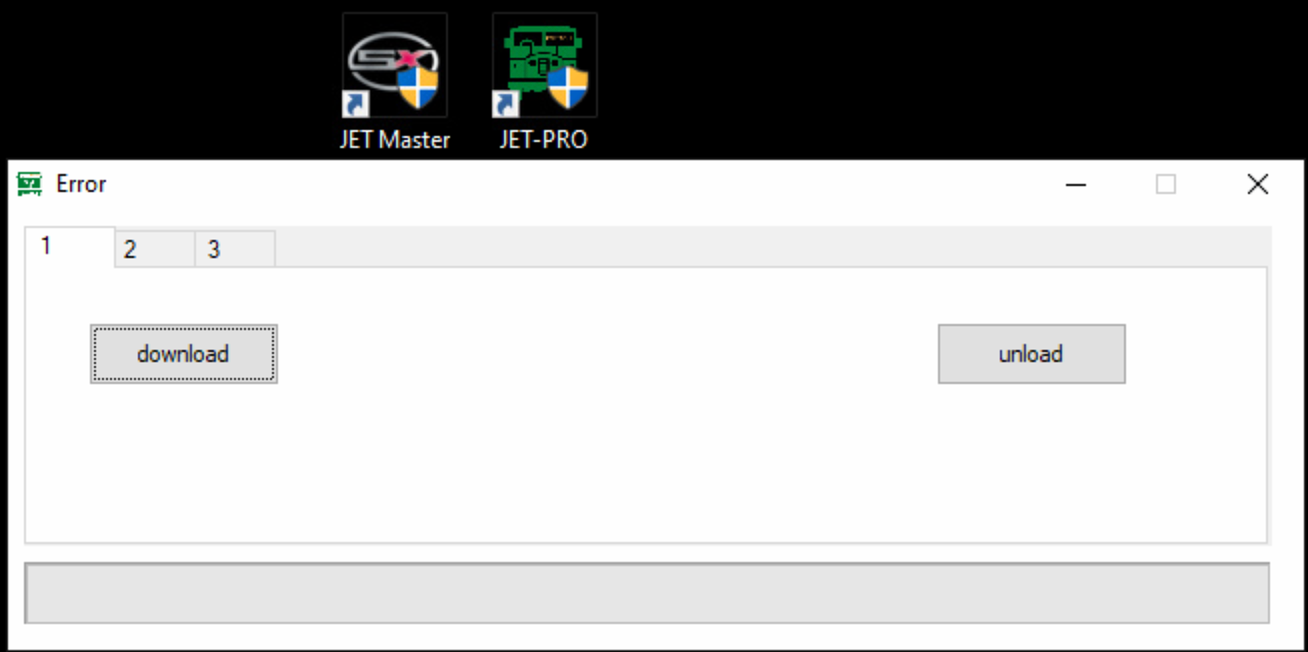
JET-Pro and JET Master icons on desktop
Step 3 — Launch JET-Pro
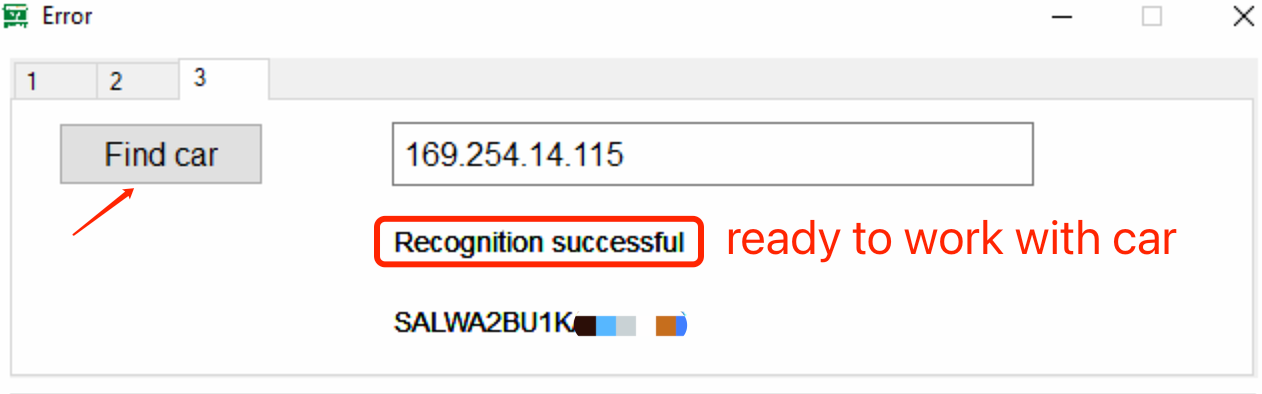
Find Car — Recognition Successful
Step 4 — Connect to Vehicle

How to Use JET-Pro with Enet

Based on real-world experiences from Land Rover Forums, Defender2, and our own technical team. Follow these steps to activate features on your 2017-2024 JLR vehicle.

1

Prepare Your Setup

Before you begin, ensure you have the right hardware and a stable environment:

  • Windows 10/11 laptop with JET-Pro installed
  • Enet cable (RJ45 to OBD2) or JLR Enet WiFi Adapter
  • Vehicle battery well-charged (12.6V+ recommended)
  • Active JET-Pro license (72-hour demo or full)
  • Disable WiFi and antivirus temporarily
JET-Pro and JET Master desktop icons
2

Connect to Your Vehicle

Physical connection depends on your hardware choice:

  • Enet Cable: Plug OBD2 end into vehicle port, RJ45 into laptop
  • WiFi Adapter: Plug into OBD2, connect laptop to adapter's WiFi network
  • Default WiFi password: 12345678
  • Wait for network connection (IP auto-assigned)
  • Launch JET-Pro software
JET-Pro Find Car — Recognition Successful
3

Read Vehicle CCF

Pull your vehicle's current configuration before making any changes:

  • Click "Connect" in JET-Pro main panel
  • Software auto-detects vehicle gateway via DoIP
  • Select "Read CCF" to pull current configuration
  • Auto-backup saves factory settings automatically
  • Review current feature flags in CCF Editor
4

Activate Features

Choose your method — script-based (easiest) or manual CCF editing:

  • Script Method: Select feature script (e.g., "PIVI ACC") → Set → Write
  • Manual Method: Navigate CCF tree → locate parameters → enable → Set → Write
  • For ACC: Enable forward collision, radar, and cruise control flags
  • For Dynamic Mode: Enable dynamic-i, suspension, and throttle flags
5

Reset CCF Memory

Critical step to ensure modules recognize new configuration:

  • Go to "MAIN" Menu Panel
  • Select "CCF Memory"
  • Choose "DADC + IGM"
  • Execute memory reset
  • This forces modules to re-learn configuration
6

Finalize & Test

Complete the process and verify your new features:

  • Check DTCs across all modules
  • Clear any communication or configuration errors
  • Lock the vehicle and let it sleep for 10 minutes
  • Restart vehicle and test activated features
  • ACC calibration may take 20-50 miles of driving
Pro Tip from Forum Users: If you encounter errors during connection, try switching to a different Enet cable (some generic BMW cables give errors). Also ensure your laptop is set to a static IP in the 169.254.x.x range if auto-DHCP fails. The JLR Enet WiFi Adapter is the most reliable option — no IP configuration needed.

Choose Your Connection Hardware

JET-Pro works with multiple Enet connection options. Pick the one that fits your workflow and budget.

Best Seller

JLR Enet WiFi Adapter

Wireless • DoIP Ready
  • Wireless connection (no cable clutter)
  • 2.4GHz WiFi with WPA2-PSK security
  • Embedded UART-ETH-WIFI module
  • DC/DC converter for stable power
  • CPU heat sink for over-temp protection
  • WiFi Client / AP / Router modes
  • Works with JET-Pro, JET Master, Pathfinder
  • Best for workshops and mobile setups

Standard Enet Cable

Budget • Wired
  • RJ45 to OBD2 cable (BMW-style Enet)
  • 2-meter length standard
  • Plug-and-play wired connection
  • May need IP configuration on laptop
  • Some generic cables cause errors
  • Works with JET-Pro and JET Master
  • Lowest cost option for DIY owners
New

JLR Enet WiFi Adapter Type-C

Modern • USB-C
  • Updated Type-C power input
  • Same wireless DoIP capability
  • Compatible with modern laptops
  • Improved power efficiency
  • Works with all DoIP JLR vehicles
  • Recommended for 2023+ models

Popular Features You Can Activate

Verified by forum users and our workshop customers. These are the most requested feature activations for JLR vehicles.

ACC

Adaptive Cruise Control

Automatically adjusts speed to maintain safe following distance. Requires existing radar hardware. The most sought-after activation.

DYN

Dynamic Mode

Sharpen throttle response, increase steering weight, firm suspension, and unlock dynamic-i menu with G-force meters and lap timers.

4x4

ATPC & TR2 Auto

All Terrain Progress Control and Terrain Response 2 Auto. Enhanced off-road traction and automatic terrain detection.

APP

Apple CarPlay / Android Auto

Activate wireless smartphone integration on 2019-2022 models. Full-screen integration with PIVI Pro and IMC systems.

KEY

Approach Unlock & Walk Away Lock

Vehicle automatically unlocks as you approach with key and locks when you walk away. No button presses needed.

BEAM

Auto High Beam Assist

Automatically switches between high and low beams based on traffic conditions. Optimal nighttime illumination.

WELC

Custom Welcome Screens

Activate SV Bespoke or 007 James Bond welcome screens for a premium startup experience on PIVI Pro displays.

STOP

Configurable Stop/Start

Customize stop/start behavior to remember your preference across journeys. No more disabling it every drive.

DRIV

Driver Assist Configurations

Fine-tune lane-keeping sensitivity, traffic sign recognition, and blind-spot monitoring settings to your preference.

DIAG

Full System Diagnostics

Read and clear DTCs from all control modules. Deep OEM-style diagnostics across IPC, BCM, KVM, HCM, and more.

JET-Pro Interface — Module Selection & Connection

Animated GIF showing JET-Pro connecting to vehicle and browsing the module dropdown list

Click Connect → select module → browse 100+ control modules including BCM, KVM, IPC, HCM, and more

JET-Pro vs. Other Solutions

See how JET-Pro compares to GAP IIDTool, dealer Pathfinder, and other aftermarket options.

Feature JET-Pro GAP IIDTool BT Dealer Pathfinder TOPIx Cloud
Vehicle Coverage 2017-2024 (DoIP) 2002-2023 All (Dealer Only) All (Cloud)
ACC Activation ✓ Yes ✗ No ✓ Yes ✓ Yes
Full CCF Editing ✓ HEX Level ✗ Limited ✓ Full ✓ Full
Firmware Flash ✓ VBF Read Write ✗ No ✓ Yes ✓ Yes
Module Replacement ✗ No ✗ No ✓ Yes ✓ Yes
Subscription Required ✓ Yes ✓ None ✗ JLR Login ✗ $32/hr+
Connectivity Enet + WiFi Bluetooth DOIP VCI DOIP VCI
Cost to Activate ACC ~$199-300 N/A ~$500-750/service ~$550+ (tool + sub)
Mobile App ✓ iOS/Android ✓ iOS/Android ✗ Windows Only ✓ Browser
Engineering Mode ✓ Full ✗ Limited ✓ Full ✓ Full

Verdict: JET-Pro is the best aftermarket solution for owners and specialists who need dealer-level coding and module access without ongoing subscriptions. For quick DTC checks and simple changes, GAP IIDTool remains simpler. For dealer-level everything, JET-Pro wins on capability and cost.

What Forum Users Say

Real experiences from Land Rover Forums, Defender2, and other JLR communities.

"I was able to get ACC activated using the JET PRO using the 3-day demo license. I also enabled dynamic mode and a couple other features. Used a Bluechok Enet cable from Amazon. Thanks to Gary for his support."

Drifting (verrilli)
Land Rover Forums — Oct 2023

"The 'PIVI ACC' script worked for my MY20. The JET Pro software for $99 will activate everything the gap tool can plus ACC, ATPC AND TR2 AUTO, so not bad value for the money."

EchorecT7E
Defender2 Forum — Nov 2023

"For a cost of $216 USD, I was successful using the JET-Pro software app and a $17 OBDII ethernet cable to activate ACC and other popular features on my 2021 D90 First Edition."

ckamps
Land Rover Forums — Oct 2023

Get Expert Help with Your JLR Coding Project

Not sure which tool you need? Want a remote demo before you buy? Our JLR engineering team is ready to help. Fill out the form and we'll get back to you within 24 hours.

What We Can Do For You

  • Remote demo session on your vehicle via TeamViewer / AnyDesk
  • Recommend the right tool combo for your specific project
  • Quote for in-car remote support with job-done warranty
  • Dealer account setup for Pathfinder / TOPIx Cloud access
  • OEM retrofit parts sourcing and coding service

Support hours: 9:00 AM – 9:00 PM HKT (Mon–Sat).
WhatsApp / Telegram: +44 7751 768672
Email: info@jlrexpert.com

WhatsApp Us Call Now

Request a Callback

Fill in your details below and our team will contact you shortly.

Prefer instant chat? WhatsApp us or call +44 7751 768672

WordPress Note: Replace the <form> block above with your Fluent Forms shortcode:
[fluentform id="X"]

Complete Your JLR Toolkit

Everything you need for professional-grade JLR diagnostics, coding, and programming. Mix and match based on your projects.

Essential

JLR Enet WiFi Adapter

The best and fastest Enet WiFi adapter for JLR DoIP vehicles. Wireless connection, stable DoIP communication, works with JET-Pro and Pathfinder.

View Product
Software

JET-Pro (SX-TOOL)

Full JLR Engineering Tool for diagnostics, coding, and CCF editing. 130+ auto scripts, VBF editor, unlimited VIN support. The complete package.

View Product
Try First

Demo JET-Pro (72 Hours)

Test all JET-Pro features on your vehicle for 72 hours with one VIN. Perfect for trying ACC activation before committing to the full license.

Get Demo
Software

CCF 4.9 Editor

Standalone CCF and VBF editor for JLR 2017-2024 vehicles. Edit Car Configuration Files at hex level with inline checksum validation.

View Product
Locksmith

JET-LS (Locksmith)

Dedicated key programming tool for JLR vehicles. All keys lost, add key, KVM programming, and VIN learning. Specialist locksmith solution.

View Product
Older Vehicles

SX-CAN (CAN Bus)

JLR Engineering Tool for CAN bus vehicles (2004-2019). Diagnostics, coding, and programming for pre-DoIP era JLR vehicles including SDD-era models.

View Product
Try First

Demo SX-CAN (72 Hours)

72-hour demo of SX-CAN for testing on one CAN bus vehicle. Full diagnostic and coding features to evaluate before purchase.

Get Demo
Online Access

JLR TOPIx Cloud

Online access to JLR's official technical documentation, wiring diagrams, and service procedures. Available daily, weekly, or monthly.

View Product
Support

Technical Support

Stuck on a coding job? Need remote assistance for a complex activation? Book expert technical support from our JLR engineering team.

Book Support

Frequently Asked Questions

Answers based on real user experiences from Land Rover Forums, Defender2, and our technical support team.

What hardware do I need to use JET-Pro with my JLR vehicle?
JET-Pro works with three connection options: (1) JLR Enet WiFi Adapter (recommended — wireless, most reliable), (2) Standard BMW Enet cable (RJ45 to OBD2, budget option), or (3) JLR Enet WiFi Adapter Type-C (modern USB-C power). All connect to your vehicle's OBD2 port and communicate via DoIP (Diagnostics over Internet Protocol). Forum users report the WiFi adapter is the most stable option, while some generic Enet cables cause connection errors.
Can I activate ACC (Adaptive Cruise Control) on my Defender with JET-Pro?
Yes. Multiple 2020-2022 Defender owners have successfully activated ACC using JET-Pro with the "PIVI ACC" script or manual CCF editing. The process requires reading the vehicle's CCF, enabling ACC-related parameters, writing changes, and performing a DADC + IGM memory reset. Your vehicle must have the forward-facing radar and camera hardware installed from the factory. ACC calibration typically takes 20-50 miles of driving to complete. See our step-by-step guide above for the full process.
What is the difference between JET-Pro and JET Master?
JET-Pro includes diagnostics and coding with the CCF Editor 4.9 — this is sufficient for feature activation (ACC, Dynamic Mode, etc.). JET Master adds ECU programming and flashing capabilities (VBF upload, firmware updates, module replacement). For most owners doing feature activation, JET-Pro is enough. For workshops doing module swaps, VIN writing, or firmware flashing, JET Master is required. Both use the same Enet connection hardware.
Do I need JLR Pathfinder or TOPIx Cloud subscription to use JET-Pro?
No. JET-Pro is a standalone engineering tool that does not require Pathfinder software or a TOPIx Cloud subscription. It connects directly to your vehicle via Enet and performs all coding and diagnostics independently. This is one of the key cost advantages over dealer-based solutions — a typical Pathfinder/TOPIx setup costs $500-1,500+ with ongoing subscriptions, while JET-Pro is a one-time purchase with no recurring fees.
What JLR vehicles are compatible with JET-Pro?
JET-Pro supports all DoIP-based Jaguar Land Rover vehicles from 2017 to 2024, including: Defender L663, Discovery 5 (L462), Range Rover L405/L460, Range Rover Sport L494, Velar, Evoque L551, Jaguar F-Pace, E-Pace, XE, XF, and I-Pace. For older SDD-era vehicles (pre-2017, including Freelander 2, L322, XJ X351, etc.), use SX-CAN instead. For 2025 models, TOPIx Cloud access is recommended alongside JET-Pro.
Is there a demo version I can try before buying?
Yes. We offer a 72-hour demo license that gives you full JET-Pro functionality for one VIN. This is the perfect way to test ACC activation or any other feature on your own vehicle before committing to the full license. Many forum users started with the demo, confirmed it works on their vehicle, and then upgraded to the full license. SX-CAN demo is also available for older CAN bus vehicles.
How long does feature activation take?
The actual coding process takes 15-30 minutes once connected. The total time depends on: (1) connection setup (5-10 min), (2) reading CCF (5-10 min), (3) applying changes (5-10 min), (4) CCF memory reset (5 min), and (5) DTC clearing and sleep cycle (10 min). Some features like ACC require a calibration drive of 20-50 miles before fully operational. We recommend completing the procedure, sleeping the car for 10 minutes, then testing the feature on your next drive.
Can I break something or brick my car?
JET-Pro includes auto-backup of factory CCF before any changes, so you can always restore original settings if something goes wrong. Forum users describe the software as "not the easiest but difficult to screw things up." The key safety rules are: (1) always backup before changing, (2) only change parameters you understand, (3) use provided scripts rather than manual editing when possible, (4) ensure stable battery voltage during the session, and (5) lock the car and let it sleep for 10 minutes after changes. For peace of mind, our technical support team can guide you remotely.
Do you offer remote support if I get stuck?
Yes. Our Technical Support product provides expert remote assistance for complex coding jobs, module programming, and troubleshooting. We support JLR full series in-car with a job-done warranty. For best results, book at least one working day in advance. Support hours are 9:00 AM to 9:00 PM Hong Kong time. We also offer a 100% money-back guarantee if we cannot complete the job as agreed.
Can I use the JLR Enet WiFi Adapter with other software?
Yes. The JLR Enet WiFi Adapter is compatible with JET-Pro, JET Master, JET-LS, SX-CAN, and even official JLR Pathfinder (with the right setup). It supports WiFi Client, AP, and Router modes with 2.4GHz 802.11b/g/n compatibility. The adapter uses transparent transmission mode, meaning it passes through raw DoIP data — making it compatible with any software that speaks the DoIP protocol over Ethernet. It's the most versatile and future-proof VCI investment for JLR work.
Still Have Questions?

Send us a quick message and a JLR specialist will get back to you within 24 hours. Or reach us directly on WhatsApp for instant support.

WhatsApp Call +44 7751 768672

Replace with [fluentform id="X"] in WordPress

Ready to Unlock Your JLR's Full Potential?

Start with a 72-hour demo, grab the JLR Enet WiFi Adapter, and activate the features you've been missing. No subscriptions. No dealer visits. Just results.

WhatsApp
W
Telegram
T
Email
@
Call
P